AELog
Extensible on-device dev tools for Kotlin Multiplatform.
AELog is a lightweight, plugin-based developer tools library for KMP apps. It provides a beautiful Compose UI overlay for inspecting logs, network traffic, and more — all without leaving the app.
What Is AELog?
The Big Picture
AELog is an in-app debugging overlay for Kotlin Multiplatform apps. Imagine you're developing a mobile app and you want to see, while the app is running:
- All log messages your code emits
- Every HTTP request your app makes
- Every analytics event being tracked
Today, developers attach a laptop, hook up Logcat (Android) or Console.app (iOS), and read logs externally. That's painful — especially on iOS, or when testing on someone else's device.
AELog solves this by drawing a debug panel directly on top of your app's UI. Tap a floating bug button → a panel slides up showing tabs for Logs, Network, Analytics. No external tools needed.
The Core Idea: Plugins
Everything in AELog is a plugin. The library itself is just a host that:
- Manages a list of installed plugins
- Renders them as tabs in an overlay panel
- Provides each plugin with a coroutine scope, an event bus, and a way to find sibling plugins
Three built-in plugins ship with the library:
| Plugin | Description |
|---|---|
LogPlugin |
Captures text logs (like Logcat) with severity filtering |
NetworkPlugin |
Captures HTTP traffic — requests, responses, and headers |
AnalyticsPlugin |
Captures analytics events and screen views with custom properties |
CrashPlugin |
Intercepts, records and persists fatal and non-fatal exceptions on device |
DatabasePlugin |
Inspects SQLite databases, Room tables, schemas, and interactive SQL queries |
Features
- Log Viewer — Real-time log inspection with severity filtering
- Network Inspector — Detailed view of HTTP traffic and JSON payloads
- Analytics Tracker — Monitor properties across app flow
- Crash Reporter — Capture and persist fatal and non-fatal exceptions on device
- Database Inspector — Auto-discover databases, browse tables, search rows, and execute SQL queries on-device
- Plugin System — Easily extend with custom decoupled
UIPluginor headlessPlugin - Compose UI — Material 3 themed overlay with dark/light mode support
- Multiplatform — Works seamlessly across Android, iOS, Desktop (JVM), and WebAssembly (WasmJs)
Quick Links
Getting Started
Requirements
| Platform | Minimum |
|---|---|
| Android | API 24 (7.0) |
| iOS | 15.0 |
| Desktop (JVM) | Java 11+ |
| Web (WasmJs) | Browser with WebAssembly support |
| Kotlin | 2.3.20 |
| Compose Multiplatform | 1.9.3 |
Installation
[versions]
aelog = "1.2.5"

[libraries]
aelog-logs          = { module = "io.github.abdo-essam:ae-log-logs",          version.ref = "aelog" }
aelog-network-ktor  = { module = "io.github.abdo-essam:ae-log-network-ktor",  version.ref = "aelog" }
aelog-analytics     = { module = "io.github.abdo-essam:ae-log-analytics",     version.ref = "aelog" }
aelog-crashes       = { module = "io.github.abdo-essam:ae-log-crashes",       version.ref = "aelog" }
aelog-database = { module = "io.github.abdo-essam:ae-log-database", version.ref = "aelog" }kotlin {
sourceSets {
commonMain.dependencies {
implementation(libs.aelog.logs)
implementation(libs.aelog.network.ktor)
implementation(libs.aelog.analytics)
implementation(libs.aelog.crashes)
implementation(libs.aelog.database)
}
}
}kotlin {
sourceSets {
commonMain.dependencies {
implementation("io.github.abdo-essam:ae-log-logs:1.2.5")
implementation("io.github.abdo-essam:ae-log-network-ktor:1.2.5")
implementation("io.github.abdo-essam:ae-log-analytics:1.2.5")
implementation("io.github.abdo-essam:ae-log-crashes:1.2.5")
implementation("io.github.abdo-essam:ae-log-database:1.2.5")
}
}
}AELog uses api dependencies to keep your build file clean.
- If you use
ae-log-network-ktor, it automatically includesae-log-networkandae-log-core. - You do not need to manually add the core library if you are already using a plugin.
Verify Installation
import com.ae.log.AELog

fun main() {
    // Simply check if AELog is accessible
    AELog.isEnabled = true
    println("AELog is accessible and enabled: ${AELog.isEnabled}")
}
AELog is accessible and enabled: trueNext Steps
- Quick Start Guide — Integrate into your app in 5 minutes
- Configuration — Customize behavior and appearance
- Custom Plugins — Build your own debug panels
Quick Start
Get up and running in just a few seconds.
1. Zero-Config (Automatic Setup)
AELog features zero-config auto-initialisation on both Android and iOS. Just add the dependencies for the plugins you want, and they automatically register themselves. No initialization code is required in your application!
2. Custom Configuration (Optional)
To disable the floating trigger notch globally (across all screens), set the static property AELog.showNotch at your app entry point (e.g. Application.onCreate() on Android):
// Disable the floating notch globally (defaults to true)
AELog.showNotch = false
3. Drop in the Overlay
Add AELogOverlay() as a sibling anywhere in your root composable — no wrapping required:
@Composable
fun App() {
    AELogOverlay() // ← Renders floating center-right notch + inspector panel as a Popup above your UI
    MaterialTheme {
        YourAppContent()
    }
}
To disable in release builds: AELog.isEnabled = BuildConfig.DEBUG
To hide the floating notch trigger locally but still open the panel programmatically: AELogOverlay(showNotch = false) then AELog.show()
3. Start Logging
Use the discoverable static APIs. AELog handles everything else behind the scenes.
// 1. Logs (with automatic tag derivation from the calling class)
AELog.log.i("App launched!")
AELog.log.d("Auth", "Token refreshed") // Or specify an explicit tag

// 2. Network (handled automatically via interceptors)
// val client = HttpClient { install(AELogKtorInterceptor) }

// 3. Analytics
AELog.analytics.logEvent("button_tap")

// 4. Crashes (manually record non-fatal exceptions)
try {
    performDangerousTask()
} catch (t: Throwable) {
    AELog.crashes.recordNonFatal(t)
}
Show / Hide the Overlay
The overlay can be triggered by:
- Floating Notch — the Dynamic Island-style pill at the top of the screen (shown by default)
- Programmatically via
AELog.show()/AELog.hide()from anywhere in your code - Custom triggers — wire
AELog.show()to a shake gesture, debug settings, or any other event
Configuration
AELog is designed to be "zero-config" by default, but provides hooks to customize both data collection and UI behavior.
Core Configuration (Data & UI Globals)
You can toggle global features like the floating notch trigger or enable/disable the logger using properties directly on AELog:
// Disable the floating notch globally (across XML & Compose screens)
AELog.showNotch = false

// Enable or disable the entire library programmatically
AELog.isEnabled = BuildConfig.DEBUG
UI Configuration
Control whether the floating notch is shown, or hide it and trigger the overlay programmatically:
// Default — shows the vertical notch trigger on the right side of the screen
AELogOverlay()

// Hidden notch trigger — open programmatically from custom buttons, shake gestures, etc.
AELogOverlay(showNotch = false)
// Then from anywhere in your codebase:
AELog.show()
AELog.hide()

// Disable the entire library (e.g. in release builds)
AELog.isEnabled = BuildConfig.DEBUG
Network Interceptors
AELog provides high-fidelity interceptors for both Ktor and OkHttp to capture HTTP traffic automatically.
Security and Header Exclusion
Both interceptors show all headers by default to provide maximum debugging visibility. To redact sensitive headers like Authorization and Cookie from the UI, pass InterceptorDefaults.COMMON_EXCLUDED to the configuration.
// Exclude common sensitive headers
val client = HttpClient {
    install(AELogKtorInterceptor) {
        excludeHeaders = InterceptorDefaults.COMMON_EXCLUDED
    }
}
Supabase Integration
Since the Supabase Kotlin SDK is built on top of Ktor, you can easily inspect all database, auth, and storage traffic by installing the AELog interceptor in the httpConfig block:
val supabase = createSupabaseClient(
    supabaseUrl = "https://your-project.supabase.co",
    supabaseKey = "your-anon-key"
) {
    install(Auth)
    // ... other modules

    httpConfig {
        install(AELogKtorInterceptor) {
            maxBodyBytes = 100_000 // Limit capture size
        }
    }
}
Ktor Body Capture
For non-destructive inspection of response bodies in Ktor, it is recommended to install the DoubleReceive plugin. AELog includes a fallback mechanism that attempts to capture the body using Ktor's internal stream handlers, but DoubleReceive is the safest approach for complex applications.
val client = HttpClient {
    install(DoubleReceive)
    install(AELogKtorInterceptor)
}
OkHttp (Android Only)
For Android apps using OkHttp directly:
val client = OkHttpClient.Builder()
    .addInterceptor(AELogOkHttpInterceptor())
    .build()
Database Inspector
AELog includes an on-device Database Inspector with live query interception for androidx.room, SQLDelight, and SQLite databases.
Room & SQLite Driver Interceptor (AELogSQLiteDriver)
To automatically intercept and log all SQL queries executed by your app in real-time across Room, SQLDelight, or raw SQLite, wrap your underlying SQLiteDriver with AELogSQLiteDriver:
// 1. Room Database Integration:
Room.databaseBuilder<AppDatabase>(name = dbFilePath)
    .setDriver(AELogSQLiteDriver(BundledSQLiteDriver(), databaseName = "app.db"))
    .build()

// 2. SQLDelight Integration:
val driver = AELogSQLiteDriver(
    delegate = NativeSQLiteDriver(Database.Schema, "app.db"),
    databaseName = "app.db"
)
val database = Database(driver)

// 3. Raw SQLite Integration:
val driver = AELogSQLiteDriver(BundledSQLiteDriver(), databaseName = "app.db")
Zero-Config Auto-Discovery
On Android and iOS, AELog automatically scans application database directories and registers existing databases without any manual setup code. Simply add the dependency:
// Shared commonMain sourceSet
implementation("io.github.abdo-essam:ae-log-database:1.2.5")
Primary API (AELog.database)
Interact with discovered databases, list tables, execute queries, and log app database transactions:
// List discovered databases
val databases = AELog.database.listDatabases()

// Browse database tables
val tables = AELog.database.listTables(dbName = "app.db")

// Execute interactive SQL queries
val result = AELog.database.query(
    dbName = "app.db",
    sql = "SELECT * FROM users WHERE active = 1"
)

// Log app database queries to inspector
AELog.database.logQuery(
    databaseName = "app.db",
    sql = "SELECT * FROM orders WHERE total > 100",
    durationMs = 3L
)
Custom Configuration (DatabasePluginConfig)
Customize security policies, write permissions, page sizes, and busy timeouts:
val dbConfig = DatabasePluginConfig(
    allowWrite = true,         // Enable INSERT, UPDATE, DELETE execution (default: false read-only)
    defaultPageSize = 100,     // Rows per page when browsing table data
    busyTimeoutMs = 5000L      // SQLite busy timeout in WAL mode
)

// Re-install DatabasePlugin with custom config
AELog.install(DatabasePlugin(config = dbConfig))
Plugins Overview
AELog uses a plugin architecture. Each plugin adds a dedicated tab to the AELog overlay panel. The library itself is just a host — plugins are what make it useful.
How Plugins Work
When you call AELog.install(...), the library:
- Installs each plugin and calls its
onAttach()lifecycle hook - Renders
UIPlugininstances as tabs in the overlay panel - Provides each plugin with access to a coroutine scope and sibling plugins via
PluginContext
Built-in Plugins
| Plugin | Module | Type | Description |
|---|---|---|---|
LogPlugin |
:ae-log-logs |
UIPlugin |
Real-time log viewer with level filtering (VERBOSE / DEBUG / INFO / WARN / ERROR) |
NetworkPlugin |
:ae-log-network |
UIPlugin |
HTTP traffic inspector with method badges, status filtering, and full body view |
AnalyticsPlugin |
:ae-log-analytics |
UIPlugin |
Tracks analytics events and screen views with expandable custom properties |
CrashPlugin |
:ae-log-crashes |
UIPlugin |
Captures, records, and persists fatal crashes and non-fatal exceptions on device |
Logs Inspector
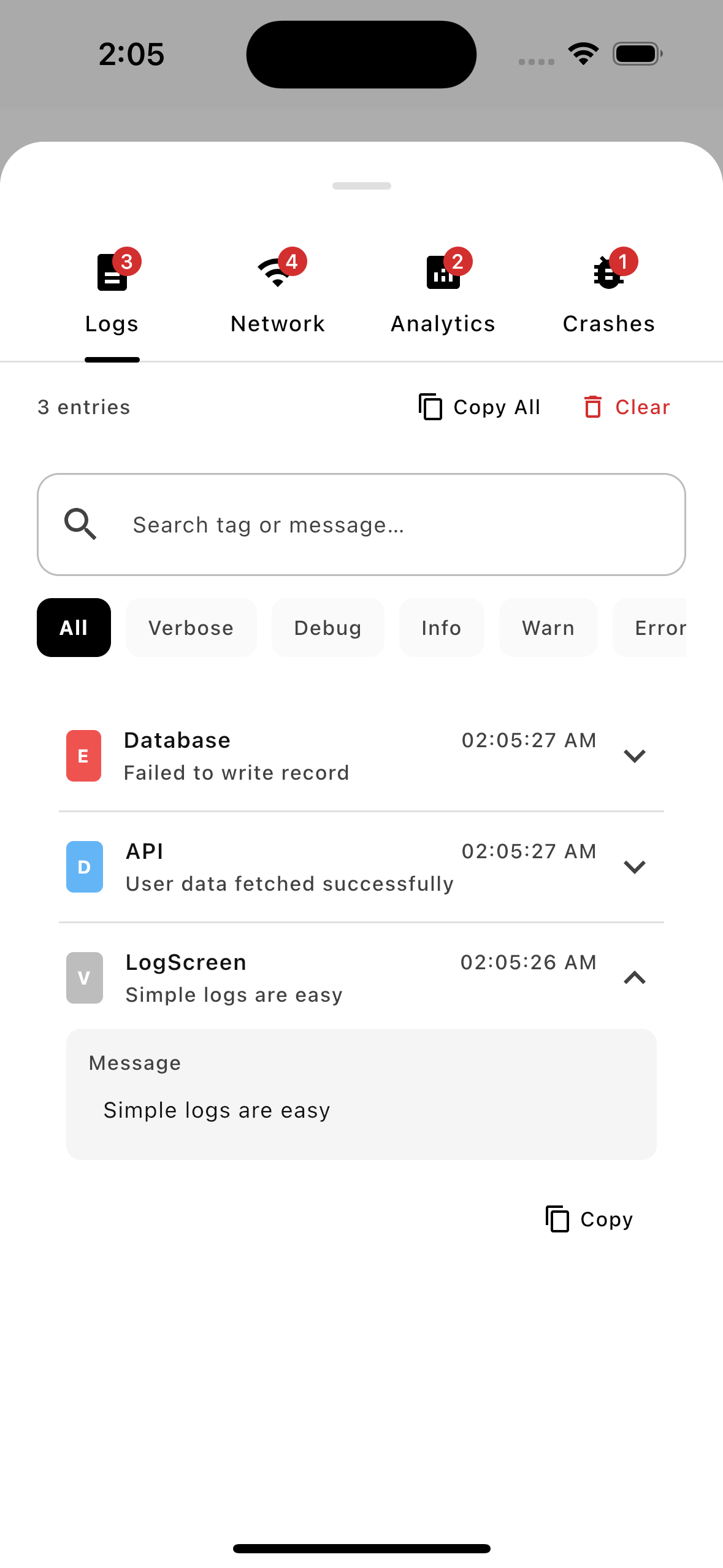
Browse console output with search capabilities and filter logs by severity level.
Network Inspector
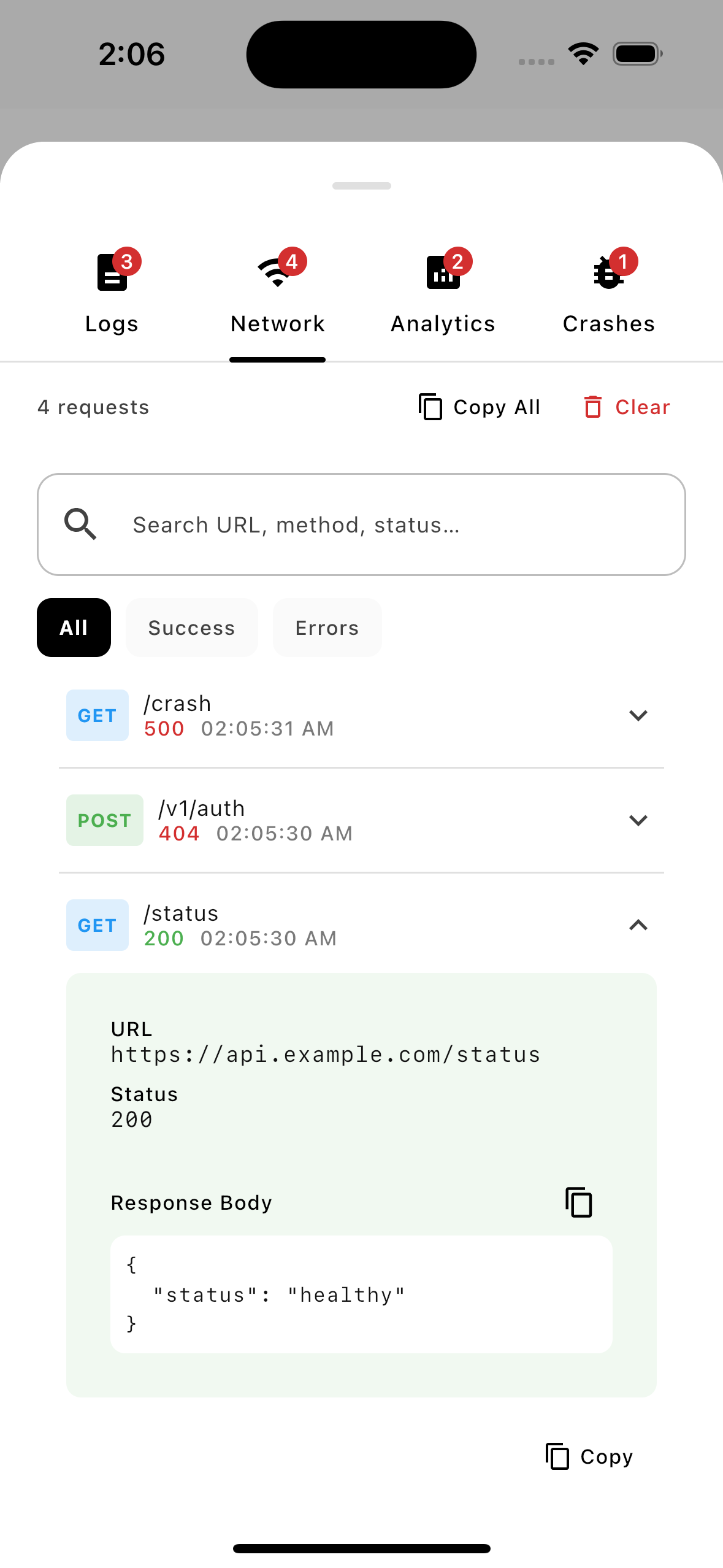
Inspect Ktor and OkHttp HTTP request/response payloads, status codes, and headers.
Analytics Tracker
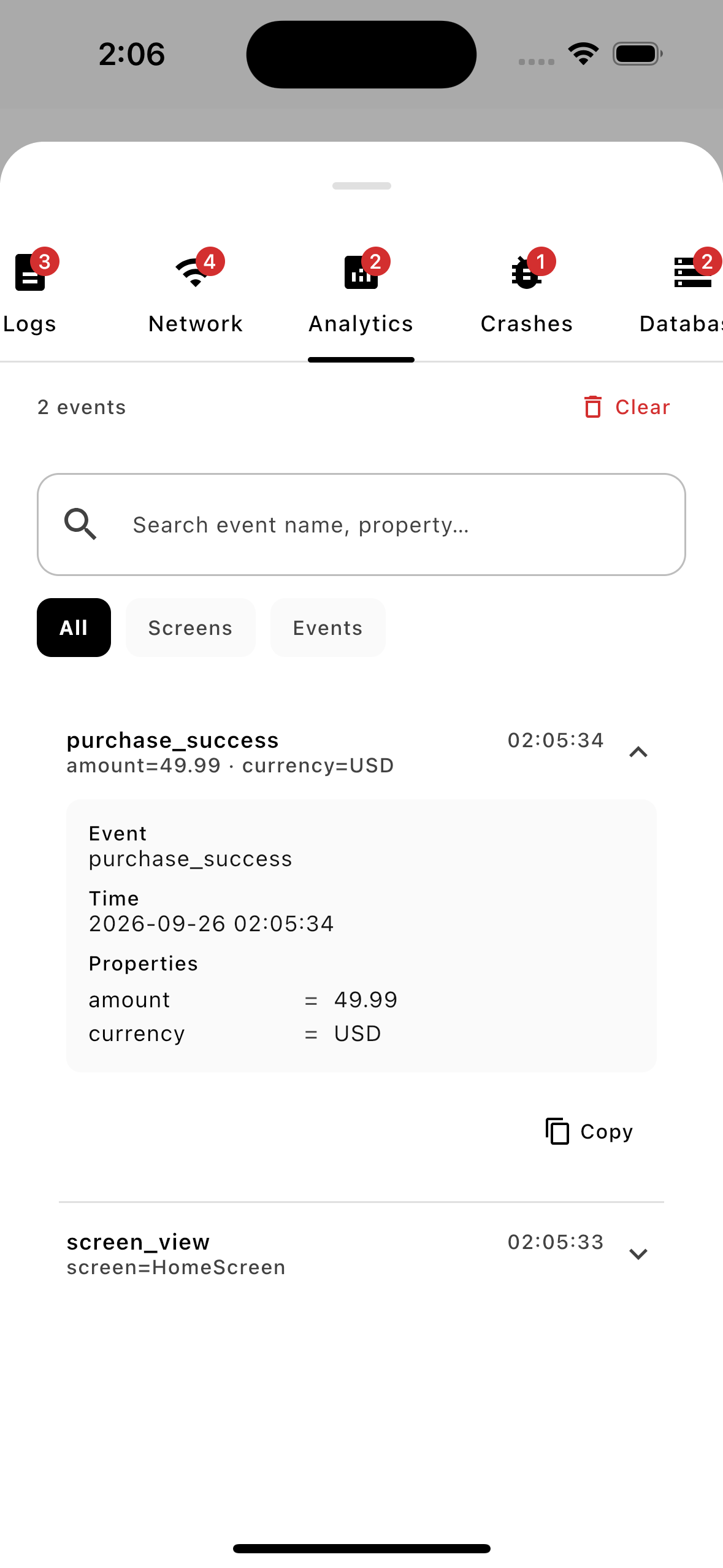
View analytics events, screen views, and user property parameters as they trigger in real-time.
Crash Reporter
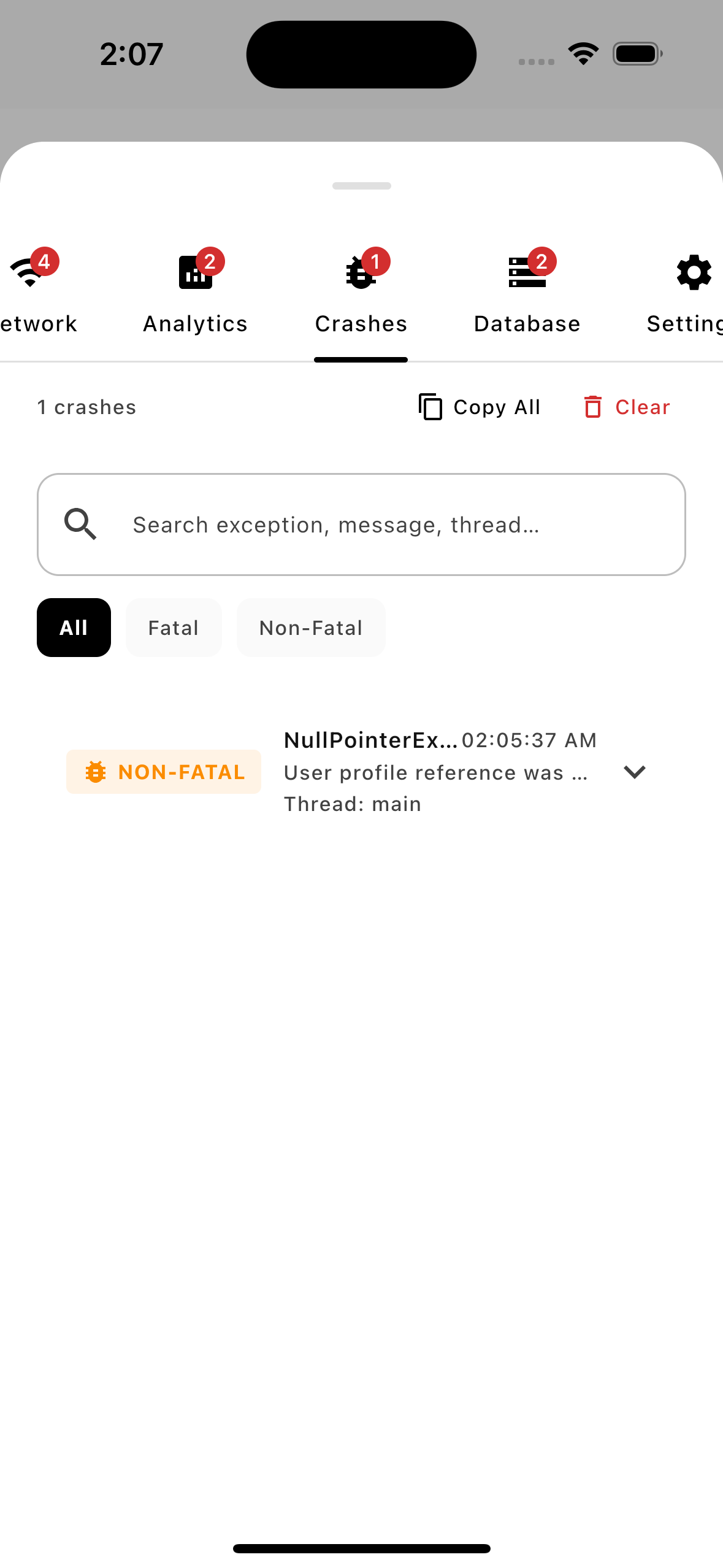
Review local fatal stack traces and persisted exception reports directly on the test device.
Database Inspector
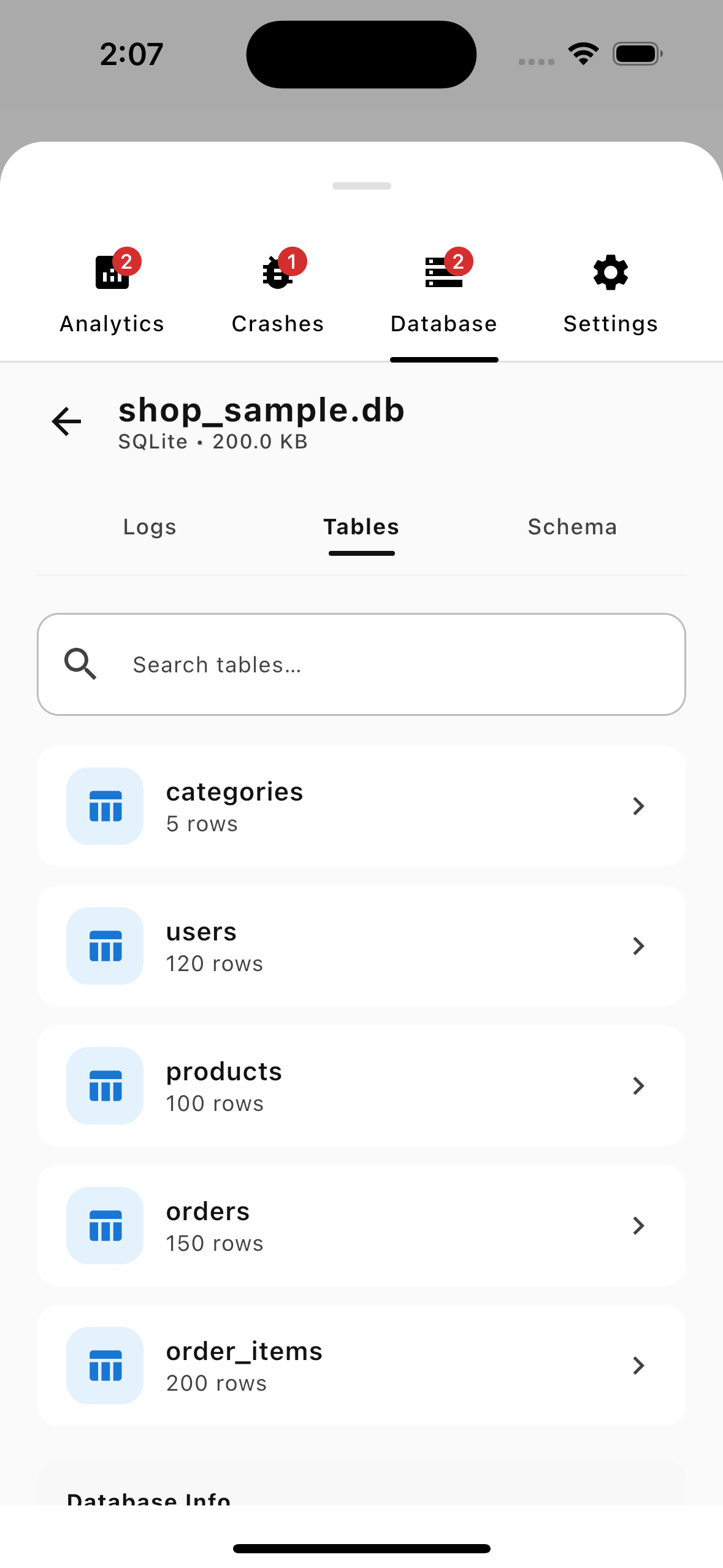
Auto-discover SQLite/Room databases, browse tables, view schemas, and run live SQL queries.
Plugin Types
UIPlugin
Renders a tab inside the AELog panel. Ideal for visually inspecting data (logs, network calls, feature flags, database records, etc.). UI plugins now own their entire layout inside the Content() composable (e.g. sticky search bars, custom headers, and scrollable lists).
Plugin (Headless)
A headless background collector with no UI. Simply implement the standard Plugin interface directly. Use it for crash collectors, performance samplers, background interceptors, or anything that needs to observe data or listen to event signals without a dedicated visual tab.
Installing Plugins
// Auto-registered on Android via ContentProvider — no code needed!
// But if you are on other platforms (like iOS) or adding custom plugins:

AELog.install(MyCustomPlugin())
Plugin Lifecycle
Each hook has a clear responsibility:
| Hook | When Called | Use For |
|---|---|---|
onAttach(context) |
Once, on install | Store PluginContext, launch background collection, subscribe to EventBus events |
onClear() |
User taps "Clear All" | Reset stored entries or memory states |
onDetach() |
On uninstall or reset | Cancel coroutines, release resources, teardown native callbacks |
Creating Custom Plugins
Build Your Own Custom Tooling
AELog is fully extensible. Learn how to write custom UI modules and headless background plugins to tailor the debugger to your team's exact workflow.
Read Custom Plugins GuideCreating Custom Plugins
AELog is designed to be extended. You can create two types of plugins:
Plugin Types
| Type | Interface | Has UI | Use Case |
|---|---|---|---|
| UI Plugin | UIPlugin |
✅ Tab + Content | Log viewer, network inspector, DB browser |
| Headless Plugin | Plugin |
❌ Headless | Crash collector, performance sampler, background worker |
Creating a UI Plugin
Step 1: Implement UIPlugin
class FeatureFlagsPlugin : UIPlugin {
    // override val id = "feature_flags" // Optional: Defaults to qualified class name
    override val name = "Flags"
    override val icon: @Composable () -> Unit = { Icon(Icons.Default.Flag, null) }

    // Override badgeCount only when your plugin tracks a meaningful live count.
    // Omit it entirely if you don't need a badge — the default shows nothing.
    private val _badgeCount = MutableStateFlow(0)
    override val badgeCount: StateFlow<Int> = _badgeCount

    private var context: PluginContext? = null

    // Called once when installed
    override fun onAttach(context: PluginContext) {
        this.context = context
        _badgeCount.value = getFlags().size
    }

    // Called when user taps "Clear All"
    override fun onClear() {
        resetFlags()
        _badgeCount.value = 0
    }

    // Called when plugin is uninstalled
    override fun onDetach() {
        context = null
    }

    // Main content rendered in the AELog panel (owns entire layout!)
    @Composable
    override fun Content(modifier: Modifier) {
        val flags = remember { getFlags() }

        Column(modifier = modifier.fillMaxSize()) {
            // Sticky search/filter bar and action headers go directly inside Content()!
            Row(
                modifier = Modifier.fillMaxWidth().padding(8.dp),
                horizontalArrangement = Arrangement.SpaceBetween
            ) {
                Text("Toggle feature flags for testing", style = MaterialTheme.typography.bodySmall)
                IconButton(onClick = { resetAllFlags() }) {
                    Icon(Icons.Default.Refresh, "Reset all")
                }
            }

            LazyColumn(modifier = Modifier.weight(1f)) {
                items(flags) { flag ->
                    FlagRow(
                        name = flag.name,
                        enabled = flag.enabled,
                        onToggle = { toggleFlag(flag.id) }
                    )
                }
            }
        }
    }
}
Step 2: Install the Plugin
// Add your custom plugin alongside the auto-registered built-ins
AELog.install(FeatureFlagsPlugin())
Step 3: Done!
Your plugin now appears as a tab in the AELog panel.
Creating a Headless Plugin
class PerformancePlugin : Plugin {
    // override val id = "performance" // Optional: Defaults to qualified class name
    override val name = "Performance"

    private val _metrics = MutableStateFlow<List<Metric>>(emptyList())
    val metrics: StateFlow<List<Metric>> = _metrics.asStateFlow()

    override fun onAttach(context: PluginContext) {
        startCollecting(context.scope)
    }

    override fun onDetach() {
        stopCollecting()
    }

    fun recordMetric(name: String, durationMs: Long) {
        _metrics.update { it + Metric(name, durationMs) }
    }
}

// Usage
val perfPlugin = AELog.getPlugin<PerformancePlugin>()
perfPlugin?.recordMetric("api_call", 250L)
Plugin Lifecycle
onAttachis called exactly once when the plugin is installed- Stale imperative lifecycle hooks (like
onStart,onStop,onOpen,onClose) are removed to keep the API surface simple and focused (YAGNI). - Always safety-check resources in
Content()— it may recompose at any time - Handle UI errors gracefully inside
Content()
Best Practices
- Keep plugins focused — one responsibility per plugin
- Use StateFlow — all reactive data should use
StateFlow - Minimize main-thread work — heavy computation goes in background coroutine scopes
- Clean up in onDetach — cancel background tasks and release state
- Test independently — plugins can be unit-tested fully in KMP commonMain
Logging Integrations
AELog works with any logging library. Just forward logs to the static AELog.log methods.
Kermit
import co.touchlab.kermit.LogWriter
import co.touchlab.kermit.Severity
import com.ae.log.AELog

class AELogKermitWriter : LogWriter() {
    override fun log(
        severity: Severity,
        message: String,
        tag: String,
        throwable: Throwable?
    ) {
        when (severity) {
            Severity.Verbose -> AELog.log.v(tag, message, throwable)
            Severity.Debug -> AELog.log.d(tag, message, throwable)
            Severity.Info -> AELog.log.i(tag, message, throwable)
            Severity.Warn -> AELog.log.w(tag, message, throwable)
            Severity.Error -> AELog.log.e(tag, message, throwable)
            Severity.Assert -> AELog.log.wtf(tag, message, throwable)
        }
    }
}

// Setup
Logger.addLogWriter(AELogKermitWriter())
Napier
import io.github.aakira.napier.Antilog
import io.github.aakira.napier.LogLevel
import com.ae.log.AELog

class AELogNapierAntilog : Antilog() {
    override fun performLog(
        priority: LogLevel,
        tag: String?,
        throwable: Throwable?,
        message: String?
    ) {
        val resolvedTag = tag ?: "Napier"
        val resolvedMsg = message ?: ""
        when (priority) {
            LogLevel.VERBOSE -> AELog.log.v(resolvedTag, resolvedMsg, throwable)
            LogLevel.DEBUG -> AELog.log.d(resolvedTag, resolvedMsg, throwable)
            LogLevel.INFO -> AELog.log.i(resolvedTag, resolvedMsg, throwable)
            LogLevel.WARNING -> AELog.log.w(resolvedTag, resolvedMsg, throwable)
            LogLevel.ERROR -> AELog.log.e(resolvedTag, resolvedMsg, throwable)
            LogLevel.ASSERT -> AELog.log.wtf(resolvedTag, resolvedMsg, throwable)
        }
    }
}

// Setup
Napier.base(AELogNapierAntilog())
Timber (Android)
import timber.log.Timber
import com.ae.log.AELog

class AELogTimberTree : Timber.Tree() {
    override fun log(priority: Int, tag: String?, message: String, t: Throwable?) {
        val resolvedTag = tag ?: "Timber"
        when (priority) {
            android.util.Log.VERBOSE -> AELog.log.v(resolvedTag, message, t)
            android.util.Log.DEBUG -> AELog.log.d(resolvedTag, message, t)
            android.util.Log.INFO -> AELog.log.i(resolvedTag, message, t)
            android.util.Log.WARN -> AELog.log.w(resolvedTag, message, t)
            android.util.Log.ERROR -> AELog.log.e(resolvedTag, message, t)
            android.util.Log.ASSERT -> AELog.log.wtf(resolvedTag, message, t)
            else -> AELog.log.d(resolvedTag, message, t)
        }
    }
}

// Setup
Timber.plant(AELogTimberTree())
Ktor Client Logging
import io.ktor.client.*
import io.ktor.client.plugins.logging.*
import com.ae.log.AELog

val client = HttpClient {
    install(Logging) {
        logger = object : Logger {
            override fun log(message: String) {
                // Forward to AELog
                AELog.log.d("HTTP", message)
            }
        }
        level = LogLevel.ALL
    }
}
Direct Usage (No Library)
// Use the static shorthands
AELog.log.i("MyApp", "App started")
AELog.log.e("Auth", "Login failed", error)
Changelog
All notable changes and releases of AELog are detailed below in our interactive project roadmap.
v1.2.5 — September 28, 2026
Fixed
- Android SQLite Driver Packaging: Linked
androidMainexplicitly tononWasmMainin the AGP Kotlin Multiplatform library configuration, ensuringAELogSQLiteDriveris correctly packaged intoae-log-database-android's AAR for Android consumers.
v1.2.4 — September 27, 2026
Added
- Universal SQLite Driver (
AELogSQLiteDriver): Unified SQLite driver query interception directly inplugins:databasesupporting Room, SQLDelight, and raw SQLite. - BaseDatabaseInspector & Platform Utilities: Shared file resolution, schema reflection, and query parsing across platforms.
Fixed & Improved
- SQL Security Hardening: Strict validation of sort column identifiers and escaped search queries to prevent SQL injection.
- Connection Pooling & Caching: Fast-path lookups and connection reuse to eliminate filesystem scanning churn.
- Thread-Safe Database Registry: Protected against race conditions under concurrent access.
- Log Isolation: Instantiable
DatabaseLogRecorderowned perDatabasePlugin.
v1.2.3 — September 26, 2026
Fixed
- Database Inspector Log Duplication Fix: Prevented internal preview queries (`getTableData()` and log card expansion) from recording into
DatabaseLogRecorder, resolving duplicate query records in Database Logs.
v1.2.0 — September 26, 2026
Added
- Database Inspector Plugin (
plugins:database): On-device SQLite database inspection for Compose Multiplatform (Android, iOS, JVM, WasmJs) with auto-discovery, table list, schema browser, paginated data grid, and interactive SQL console. - Room Database Adapter (
plugins:database:adapters:room):AELogRoomAdapterfor direct integration withandroidx.roomdatabases. - Movable Floating Notch View: Freeform 2D dragging for the notch button anywhere on screen with position retention across overlay open/close actions.
- Modern Navigation & UI Components: Material 3 underline tabs, solid filter chips without ripples, and vertical scrollbars.
v1.1.9 — August 15, 2026
Added
- Dark Mode Support: Full support for Dark and Light themes across the entire UI.
- Settings Tab: A new dedicated tab for library configuration, including theme mode selection (System, Light, Dark).
- Reactive Theming: Enhanced
LogThemeto reactively update colors and typography across all plugins without requiring a manual panel restart.
v1.1.7 — June 8, 2026
Fixed
- Ktor Interceptor Response Capture: Fixed Ktor interceptor in
log-network-ktorto correctly capture response body payloads on error responses (like HTTP 401). By intercepting the response body inreceivePipeline.Stateafter Ktor'sSaveBodyplugin has buffered it, we ensurerawContentcan be read as a fresh channel and the response is safely logged without exhausting the stream or throwing exceptions. - iOS Test Name Compatibility: Renamed backtick-quoted test names containing parentheses to prevent Kotlin/Native compilation failures on iOS simulator targets.
v1.1.6 — June 8, 2026
Added
- Global Notch Toggle: Added static property
AELog.showNotchto allow globally enabling/disabling the floating trigger notch across all screens. - Zero-Config iOS & Android Auto-Init: Synchronized documentation and setups to highlight zero-config auto-initialization on both Android and iOS targets.
Removed
- AELog.configure & LogConfig: Removed the configure DSL block and
LogConfigclass, enforcing zero-config sensible defaults for all plugins. - onMigrateFrom Lifecycle Hook: Removed the obsolete
onMigrateFrom(oldPlugin)hook from thePlugininterface and its overrides in built-in plugins (LogPlugin,NetworkPlugin,AnalyticsPlugin) due to the deprecation of dynamic configuration hot-swaps.
Fixed
- iOS test isolation — duplicate plugin rejected silently: Fixed by calling
AELog.resetForTesting()at the top of every@BeforeTestto evict any eagerly-registered plugins before the test installs its own.
v1.1.5 — June 3, 2026
Fixed
- MaterialTheme Linkage Crash on iOS: Completely removed references to standard Compose MaterialTheme companion property accesses across core and plugins, replacing them with a custom static
LogTheme. This preventsIrLinkageErrorcrashes on iOS when linking AELog into applications using mismatched Compose Multiplatform versions.
v1.1.4 — June 2, 2026
Added
- Zero-Config iOS Auto-Initialization: Added auto-initialization for all four core plugins on iOS using
@EagerInitializationin KMP shared modules. iOS consumers now enjoy completely zero-code plugin setup just like Android!
Fixed
- Ktor Interceptor Payloads: Fixed handling of raw
StringandByteArrayrequest bodies in Ktor client whenContentNegotiationis not installed. - Notch Label Clipping: Resolved notch button label clipping/invisibility on iOS by removing the static
requiredWidthconstraint and settingsoftWrap = falseon the rotated Compose Text.
v1.1.1 — June 1, 2026
Added
- Request Body on Error: Network logs now capture and display the request body early in the request pipeline, ensuring it remains visible even when requests fail with client/server errors or network exceptions.
- Smart Binary Upload Handling: Binary uploads (like images/documents via
multipart/form-data) are no longer dumped as raw binary strings into logs. AELog now displays a clean summary like<image/png: 110370 bytes>, preventing memory bloat and UI lag.
Changed
- Premium Code Block Styles: Request and response body sections in the network details view now render with a solid, clean white background and black text in light theme for maximum readability.
- Enhanced Contrast for Success Responses: Successful network entry detail sections are highlighted with a subtle green tint (
Color(0xFF4CAF50).copy(alpha = 0.08f)) to distinguish them from the sheet background.
v1.1.0 — June 1, 2026
Added
- DeviceInfo in crash reports: Crash events now capture a
DeviceInfosnapshot at crash time (device model, OS version, app version, build number). When a QA tester taps Copy on any crash, the clipboard text now includes a── Device Info ──section with full context — no need to ask the developer which build or device was affected. DeviceInfoexpect/actualimplemented for Android (android.os.Build+PackageManager), iOS (UIDevice+NSBundle), and JVM (system properties fallback).
v1.0.9 — May 31, 2026
Removed
- EventBus & lifecycle signals (YAGNI): The
EventBus,Event, andAELogLifecycleclasses have been deleted. None of the built-in plugins consumed these signals, so they were speculative plumbing that added unnecessary complexity. ThecollectEventsextension onPluginContextand theeventBusproperty are also gone.
Changed
AELog.clearAll()now delegates directly toPluginManager— the intermediateAELogLifecycle.clearAll()indirection is gone.PluginContextis now simpler: onlyscope,config, andgetPlugin()— no event infrastructure.
v1.0.8 — May 31, 2026
Fixed
- Ktor request body not logged for JSON POST requests: When
ContentNegotiationserializes a data class, Ktor produces aWriteChannelContent(stream). The interceptor now drains the stream into a byte array, logs the decoded JSON body, and re-wraps it asByteArrayContent— so the actual HTTP request body is fully preserved.
Tests
- Added
records JSON request bodytest asserting that asetBody(...)POST withContentType.Application.Jsonrecords the body content in the log export. - Extended
records POST requestwith body assertions (name,test) to prevent regression.
v1.0.7 — May 29, 2026
Simplified
- Unified Plugin Architecture: Consolidated the redundant
DataPluginmarker interface andUIPluginunder a single, streamlinedPluginbase contract. - Auto-Generated IDs: Added reflection-based qualified class name
iddefaults, eliminating manual ID registration boilerplate. - Consolidated UI layout: Removed legacy layout slots (
HeaderContent()andHeaderActions()) fromUIPlugin. Plugins now have 100% layout control (like sticky search/headers) directly insideContent(). - YAGNI Lifecycle Cleanups: Purged unused imperative hooks (
onStart(),onStop(),onOpen(),onClose()) from the plugin interface to keep the API surface simple and minimal.
v1.0.6 — May 28, 2026
Added
- Unified Configuration DSL: Replaced legacy, fragmented initialization methods (
configureCore,configurePlugin) with a robust, type-safe, and atomicAELog.configure { ... }builder DSL. - Global Notch Configuration: Added
showNotchparameter toLogConfigandAELogBuilderto allow developers to completely disable the floating notch trigger globally during startup. - High-Fidelity Edge-Docked Notch: Redesigned the floating trigger notch from a top-center pill into a premium vertical button docked snug against the right edge of the screen.
Fixed
- Overlay Layout Clipping: Resolved the 0x0 parent measurement constraint bug in
AELogOverlay.ktby applyingModifier.fillMaxSize()with touch pass-through bounds. - Removed Obsolete APIs: Completely purged deprecated legacy configuration methods and old UI wrappers (such as
LogProviderandUiConfig).
v1.0.5 — May 10, 2026
Added
stability-config.conf— targeted Compose compiler stability config.NetworkMethod.UNKNOWN— safe fallback for custom/unknown HTTP verbs.androidMaincallerTag()— added Android-specific skip prefixes to stack walker.- Network UI: Single-scroll detail view, custom Status Badges showing HTTP status codes, and animated in-flight request row indicator.
- UI Timestamps: Localized 12-hour AM/PM format display.
- Interceptors: Excluded headers configurations completely hiding credentials/tokens.
Fixed
- UI: Bottom sheet selected tab state persistence.
- OkHttp: Captured request bodies with null Content-Type.
- Critical: Removed
LogEntrydefault parameter side-effects and Napler/Timber/Ktor pipeline duplicate error messages.
v1.0.4 — May 7, 2026
Added
- Modular Subprojects: Completely reorganized and split the AELog project into independent sub-modules (e.g.,
:core,:log-logs,:log-network,:log-network-ktor,:log-network-okhttp,:log-analytics,:log-crashes). - Comprehensive Testing Suite: Added full test coverage for Ktor and OkHttp interceptors alongside automated stress and performance benchmark suites.
Changed
- Standardized UI Naming: Renamed all UI components to standardized
Log*prefixes (likeLogNotchButton,LogInspectorPanel). - AELog Interceptor Prefixes: Relocated and standardized interceptor naming conventions using
AELogprefixes (e.g.,AELogKtorInterceptor,AELogOkHttpInterceptor).
v1.0.3 — May 5, 2026
Added
- Pulsing Animation: Added a dynamic, pulsing status dot indicator for in-flight requests in the Network inspector list and detail view.
- Interactive UI Components: Added reusable
ActionButtonandActionCardlayout components for plugin builders.
Changed
- Decoupled Architecture: Extracted core functionality to simplify plugin registration and decouple core engine from plugin lifecycles.
- Improved Security: Standardized header exclude management in network interceptors.
Fixed
- API Robustness: Enhanced thread safety and memory leak prevention across the core event bus and database storage layers.
v1.0.2 — May 3, 2026
Fixed
- Fixed lint errors in
LogProviderandOkHttpInterceptor. - Resolved prefix naming consistency issues.
v1.0.1 — May 2, 2026
Added
- Standardized
IdGeneratoracross all modules. - Improved URL decoding for query parameters.
v1.0.0 — May 1, 2026
Added
- 🎉 Initial production release.
- Core
AELogengine with modular plugin architecture. - Material3 themed UI with light/dark mode support and adaptive layout bounds.
- Floating debug button trigger and interactive inspector panel.
Contributing to AELog
First off, thank you for considering contributing! 🎉
Table of Contents
- Code of Conduct
- Getting Started
- Development Setup
- How to Contribute
- Pull Request Process
- Coding Standards
- Architecture Overview
Code of Conduct
This project follows our Code of Conduct. By participating, you agree to uphold this code.
Getting Started
Prerequisites
- JDK 17+
- Android Studio Ladybug or later / Fleet
- Xcode 15+ (for iOS targets)
- Kotlin 2.2.0+
Development Setup
# Clone the repository
git clone https://github.com/abdo-essam/AELog.git
cd AELog

# Build the project
./gradlew build

# Run tests
./gradlew allTests

# Run the sample app (Android)
./gradlew :sample:composeApp:installDebug

# Check code formatting
./gradlew spotlessCheck

# Fix code formatting
./gradlew spotlessApply

# Generate API docs
./gradlew dokkaGeneratePublicationHtml

# Verify binary compatibility
./gradlew apiCheck
How to Contribute
🐛 Reporting Bugs
- Use the Bug Report template
- Include: KMP version, platform, steps to reproduce, expected vs actual behavior
💡 Suggesting Features
- Use the Feature Request template
- Describe the use case, not just the solution
🔧 Submitting Changes
- Fork the repository
- Create a feature branch:
git checkout -b feat/my-feature - Make your changes
- Add/update tests
- Run the full check:
./gradlew check - Commit using Conventional Commits
- Push and open a Pull Request
Pull Request Process
- Fill out the PR template completely
- Ensure CI passes — all checks must be green
- One approval required from a maintainer
- Squash merge is preferred for clean history
- Update CHANGELOG.md under
[Unreleased]
Coding Standards
Kotlin Style
- Follow Kotlin Coding Conventions
- Use
explicitApi()— all public APIs need visibility modifiers - Mark internal APIs with
internalkeyword - KDoc on all public classes, functions, and properties
Commit Conventions
We use Conventional Commits:
feat: add network inspection plugin
fix: resolve theme bleed into host app
docs: update plugin creation guide
test: add LogStorage unit tests
refactor: extract log filtering to separate class
chore: update Kotlin to 2.3.0
perf: cache LogEntry computed properties
ci: add iOS build to CI pipeline
Architecture Rules
- Plugins must extend the core Plugin lifecycle classes
- No Android-specific imports in
commonMain - All state exposed as
StateFlow(no LiveData) - Compose UI uses Material3 exclusively
- Keep the public API surface minimal